12 n8n workflows by industry: real estate, legal, healthcare, HR (with real costs)
Three workflows per industry, described node by node: the trigger, the AI step, where a human approves, the sensitive data and the closest n8n.io template. Then what they cost to run each month and what to set up before production. Prices, versions and vulnerabilities checked on 15 September 2026.
Zakaria El Asri20 min
The method
Trigger, AI step, human approval, action, audit log: the same chain in all four industries.
In short
The short answer
A useful n8n workflow for a small business almost always follows the same chain: a trigger, an AI step, human approval, an action in your tools and an audit log. This guide details 12 of them, three each for real estate, legal, healthcare and HR. As of 15 September 2026, a Hetzner CX23 VPS costs €5.49 excl. VAT per month, n8n Cloud Starter €20 per month billed annually for 2,500 executions, and 1,000 runs at 2,000 input and 300 output tokens cost $3.50 with Claude Haiku 4.5. If you self-host on the 1.x line, run at least version 1.123.17: CVE-2025-68613 has been in the CISA catalog of exploited vulnerabilities since 11 March 2026.
Generic examples ("send a Slack message when a form is submitted") are everywhere. The ones in this guide start from a business problem and show what an n8n.io template leaves out: where the human sits, which data must stay out of the prompt, and what it costs to run.
How to use
How to read the 12 workflows
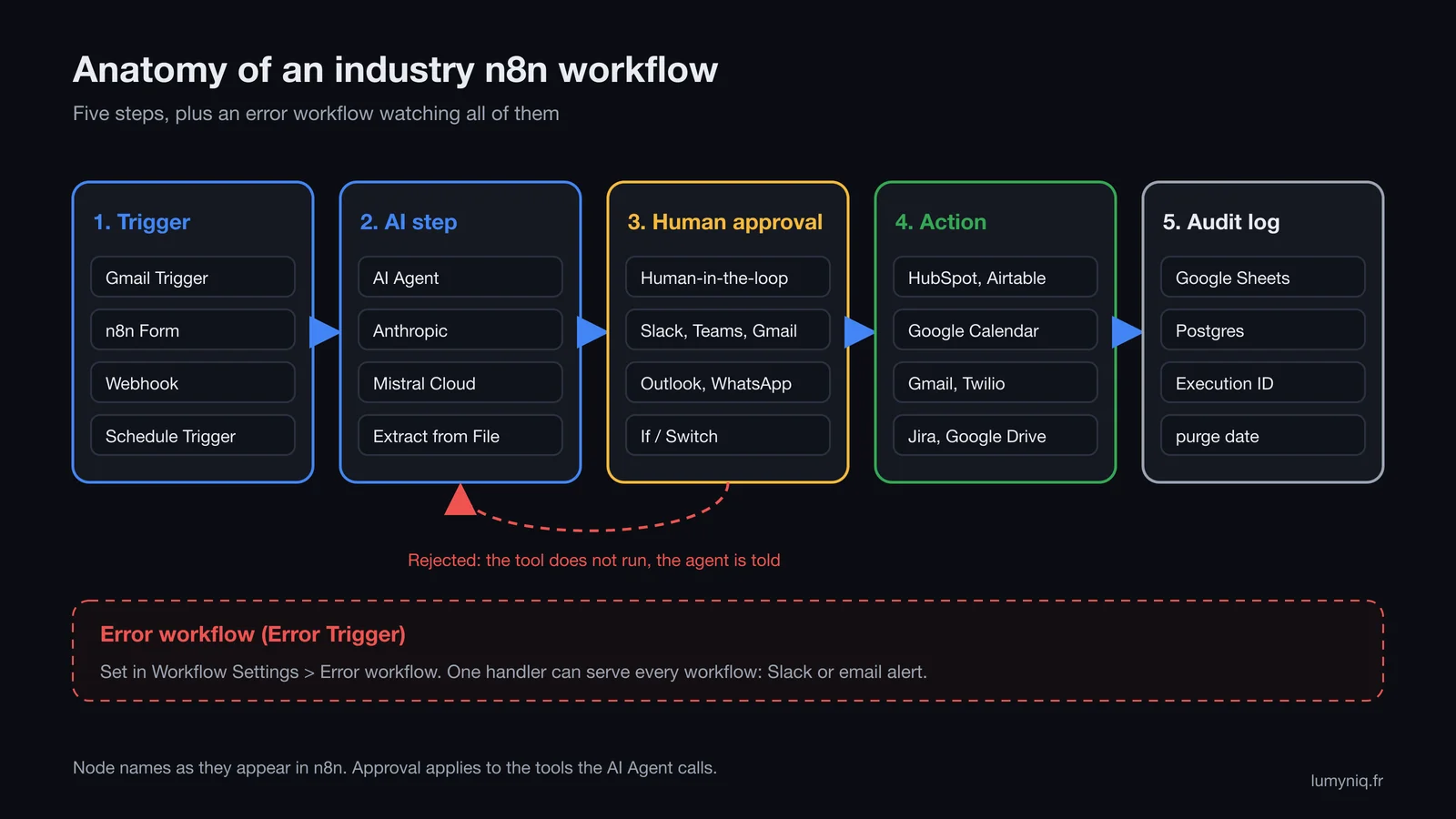
Each card follows the same structure, matching the five steps in the diagram below.
Lumyniq diagram. Node names taken from the n8n documentation on 15 September 2026.
Trigger: what starts a run (an email, a form, a webhook, a time). It sets how many executions you are billed for on n8n Cloud.
AI step: extraction, classification or drafting, through the Anthropic node, an AI Agent or a Mistral model. The AI produces a structured suggestion.
Human approval: with Human-in-the-loop for tools, the agent pauses the run before using a tool and sends an approval request in Slack, Teams, Gmail, Outlook, WhatsApp Business Cloud, Telegram, Discord, Google Chat or n8n Chat. If rejected, the action does not run and the AI is told.
Action: the write to the CRM, calendar or inbox.
Audit log: one row per run with the execution ID, the decision and, for personal data, the purge date.
Node names are n8n's own. n8n.io templates are free; their update dates are as shown in the gallery on 15 September 2026, and their node lists are summarised.
Industry 1
Three n8n workflows for real estate
Sales and lettings agencies repeat the same tasks every week: sorting enquiries, following up, checking applicant files. Industry constraints are covered in our AI for real estate guide. One more useful template outside the three cards: no. 17510 by Oneclick AI Squad, which builds a listing package from room photos with Claude.
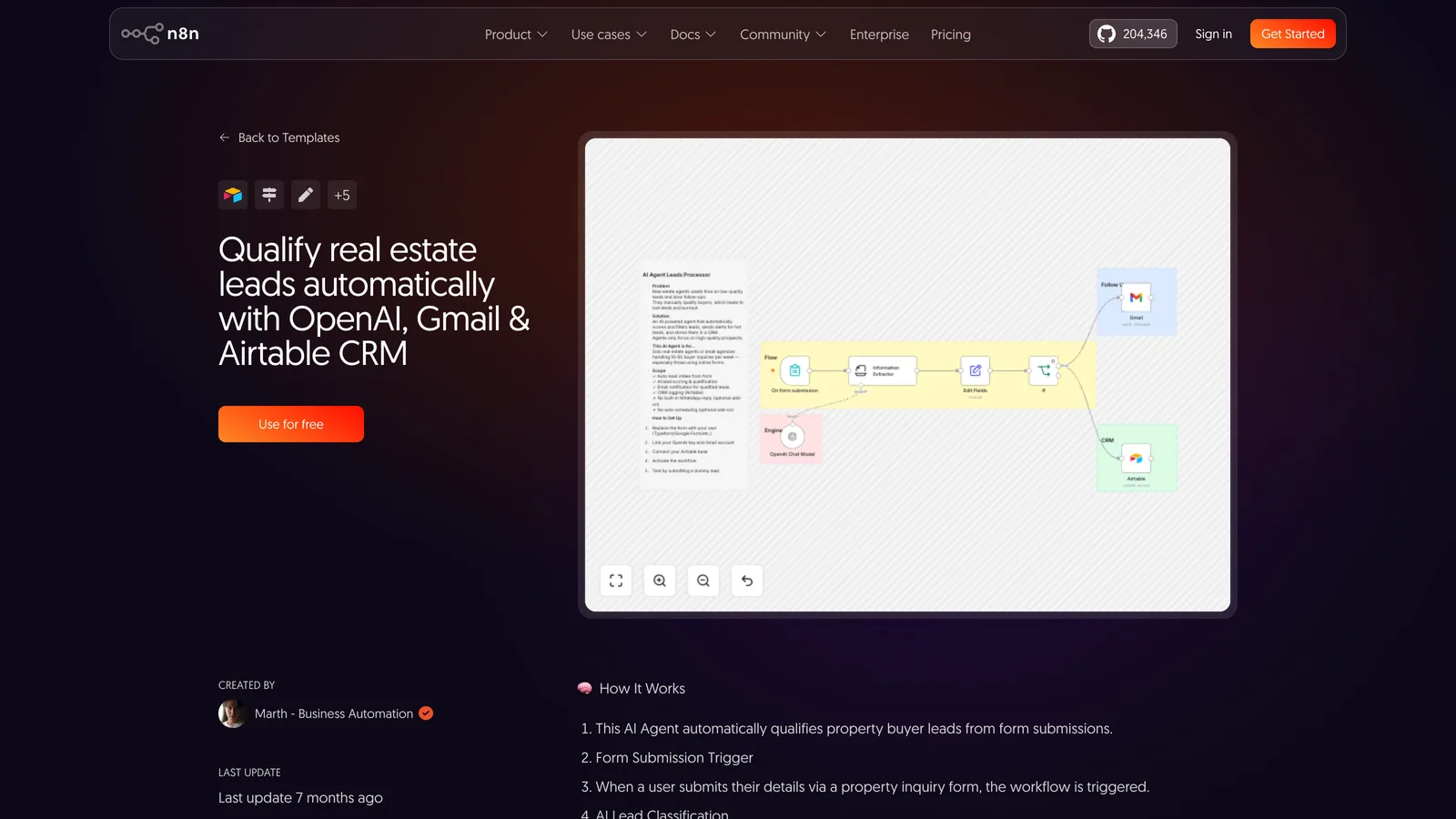
Source: n8n.io, template no. 5428. Captured 15 September 2026.
1. Qualify enquiries from property portals and your website
The problem
Enquiries arrive at any hour. Agents call back the newest first, without knowing which ones have a realistic budget and timeline.
Trigger
Gmail Trigger on the inbox that receives portal alerts, or an n8n Form on your website.
The agent drafts the contact record and the reply. Human-in-the-loop for tools sends an approval request in Slack to the agent on duty: without approval, nothing is created in HubSpot and no email goes out.
Sensitive data
In France, the CNIL limits pre-viewing data collection to identity, contact details and search criteria. The workflow asks for no supporting documents at this stage.
A prospect with no reply within the hour contacts the next agency. Follow-up texts are sent by hand, when someone remembers.
Trigger
Incoming Twilio SMS or WhatsApp Business Cloud message.
Node chain
Webhook (Twilio)→
AI Agent→
Postgres Chat Memory (key: phone number)→
Google Calendar tool (slots)→
If (viewing requested)→
Twilio (reply)→
Google Sheets (log)
Human approval
Booking in Google Calendar is a tool gated by Human-in-the-loop: the AI confirms the viewing only after the agent approves in Slack or WhatsApp. A rejection goes back to the AI, which offers another slot.
Sensitive data
Since 2 August 2026, Article 50 of the EU AI Act requires telling the prospect they are talking to an AI, at the latest at the first interaction. Put the notice in the first text message.
One rental listing brings dozens of PDF applications, often incomplete or full of documents French law forbids landlords to request.
Trigger
Email Trigger (IMAP) on the applications address.
Node chain
Email Trigger (IMAP)→
Extract from File→
Anthropic (Analyze Document: document type)→
Switch (allowed document or not)→
AI Agent (file summary)→
Postgres (file and purge date)→
Schedule Trigger (daily purge)
Human approval
The AI classifies documents and summarises the file. Accepting or rejecting an applicant stays with the property manager, who approves in Microsoft Teams before anything is sent: a rejection based solely on automated processing raises GDPR Article 22.
Sensitive data
French decree no. 2015-1437 limits documents to identity, address, employment and income: anything else (bank statements, health insurance card) is deleted on receipt. Documents of unsuccessful applicants: 3 months in the active database under the CNIL 2021 framework. Whether a rental solvency score falls under Annex III of the AI Act is unsettled.
Closest n8n.io template
No n8n.io gallery template retained for this case in our 15 September 2026 review.
Industry 2
Three n8n workflows for a law firm
In a law firm, the constraint that shapes the architecture is professional secrecy: every document sent to an AI model leaves your premises. Use cases and specialised tools are covered in our AI for legal guide.
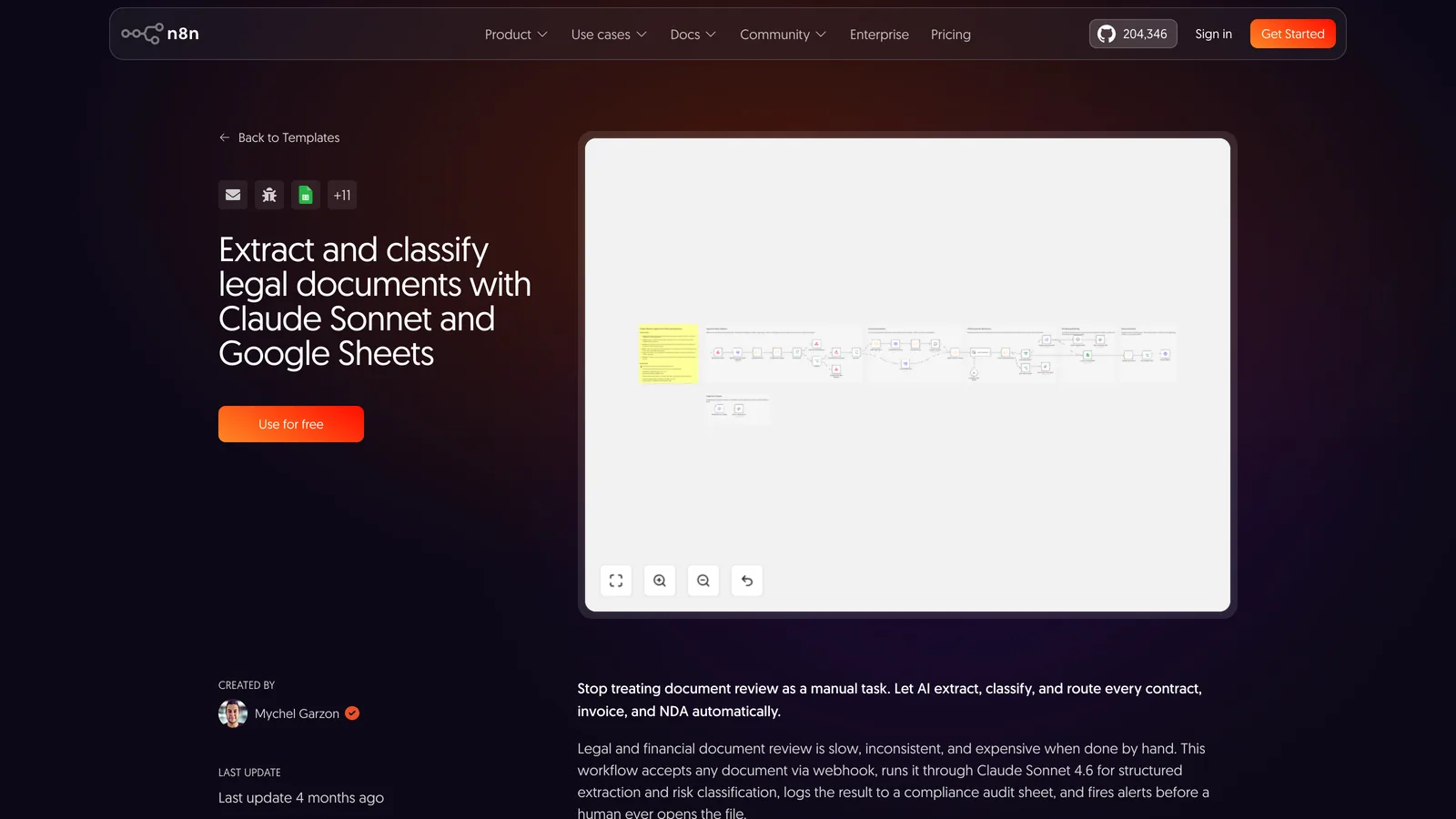
Source: n8n.io, template no. 15790. Captured 15 September 2026.
4. Pre-qualify new client enquiries
The problem
Enquiries arrive through the website with no practice area or urgency identified. A partner reads them all to decide who calls back.
Trigger
n8n Form (practice area, summary of facts, contact details).
Node chain
n8n Form→
Anthropic (practice area, urgency, deadline mentioned by the client)→
If (urgent)→
AI Agent with Gmail tool→
Slack (lead lawyer)→
Google Sheets (enquiry register)
Human approval
The acknowledgement goes out automatically and contains no analysis. Any substantive reply and accepting the matter need the lawyer’s approval (Human-in-the-loop in Slack or Outlook). Conflict checks stay manual.
Sensitive data
The client’s account is covered by professional secrecy from the first contact. The text goes to the model provider: check its location, retention period and data use terms before connecting the form.
5. Extract and classify contracts, NDAs and invoices
The problem
Every incoming document is read in full to find parties, dates, amounts and risky clauses.
Trigger
Webhook called by the document management system or an upload form.
Node chain
Webhook→
SHA-256 hash (duplicates)→
SSRF check on the received URL→
Extract from File (PDF)→
Anthropic, Claude Sonnet (extraction and risk level)→
Switch (LOW, MED, HIGH)→
Slack and Send Email (HIGH)→
Google Sheets (audit log)→
Error Trigger
Human approval
HIGH documents go to a lawyer with the extraction. The workflow replies to no one and edits no document.
Sensitive data
The template logs every document to Google Sheets. For a law firm, a database you control (Postgres) and a log limited to metadata (hash, type, risk level, date) expose less privileged information.
The first read of a supplier contract or commercial lease always follows the same checklist: term, termination, liability, penalties.
Trigger
Google Drive Trigger on the "To review" folder.
Node chain
Google Drive Trigger→
Google Drive (download)→
Extract from File→
AI Agent (firm checklist)→
Qdrant Vector Store (firm clause library)→
HTML to PDF→
Slack→
Gmail tool (approval required)
Human approval
The report lands in Slack. Sending it to the client through the Gmail tool waits for the lawyer’s approval; on rejection, the agent is told and sends nothing.
Sensitive data
The Qdrant Vector Store holds your standard clauses and internal templates: host it with the same security as the client files.
Three n8n workflows for a medical practice or clinic
Two constraints apply to any healthcare workflow in France: health data entrusted to a provider must be hosted by an HDS-certified host, and Doctolib has neither an n8n integration nor a public API. Specialised tools are compared in our AI for healthcare guide. Workflow 8 answers patients on WhatsApp, a channel where Meta sets its own rules for AI and its own rates: our guide to AI on WhatsApp Business, Meta's rules and the monthly cost covers them for France.
7. Appointment reminders by email and SMS
The problem
Missed appointments, and front-desk time spent calling patients the day before.
Trigger
Schedule Trigger every morning.
Node chain
Schedule Trigger→
Postgres (appointments at D-3 and D-1)→
Send Email→
Twilio (SMS)→
Webhook (patient reply)→
Text Classifier with Mistral Cloud Chat Model (confirm, cancel, other)→
Postgres (log)
Human approval
A cancellation frees the slot only after the front desk approves. Replies classified as "other" land in their inbox with no automatic handling.
Sensitive data
The SMS mentions neither the reason for the visit nor the specialty. If the calendar lives in Doctolib, this workflow cannot read it: it needs a calendar you can query (practice software database or Google Calendar).
Outside front-desk hours, patients message on WhatsApp and wait until the next day for a slot.
Trigger
Twilio Webhook (WhatsApp).
Node chain
Webhook→
AI Agent→
Mistral Cloud Chat Model→
Google Calendar tool (approval required)→
Gmail (confirmation)→
Wait (24 h before the appointment)→
Twilio (WhatsApp reminder)
Human approval
The agent suggests slots; the booking goes through Human-in-the-loop. A message describing symptoms leaves the automated flow: the agent says it gives no medical advice and points to the emergency number 15 (France) for emergencies.
Sensitive data
First message: the agent says it is an AI (Article 50, since 2 August 2026). The conversation contains health data: n8n instance and database with an HDS-certified host, and a model provider whose terms cover such data.
Pre-visit questionnaires are read one by one to spot the patients who should be seen first.
Trigger
n8n Form sent to the patient.
Node chain
n8n Form→
Anthropic (structured summary)→
Switch (suggested priority)→
Date & Time→
Postgres (HDS hosting)→
AI Agent with Google Calendar tool (approval required)
Human approval
The priority is a suggestion: the doctor or nurse confirms or corrects it before the agent books a slot.
Sensitive data
The author of template 6406 states it is not HIPAA-compliant, a US standard that says nothing about HDS. Software that informs a medical decision may fall under the Medical Device Regulation; for those systems, AI Act obligations tied to Annex I apply from 2 August 2028.
Recruitment is the most regulated case of the four industries: AI systems that filter job applications are listed in Annex III of the AI Act. Other HR use cases are covered in our AI for HR guide.
10. First-pass screening of CVs received by email
The problem
One job ad brings more CVs than the recruiter can read carefully in a week.
Trigger
Email Trigger (IMAP) on the applications address.
Node chain
Email Trigger (IMAP)→
Extract from File→
Anthropic (criteria grid from the job description)→
Edit Fields→
Airtable (talent pool)→
AI Agent with Gmail tool (approval required)
Human approval
The AI fills in a grid criterion by criterion, quoting the CV sentence behind each score. The recruiter approves every move to interview and every rejection: the workflow never rejects a candidate on its own.
Sensitive data
Annex III of the AI Act (point 4) covers systems used to analyse and filter job applications: high-risk obligations apply from 2 December 2027. Today already, GDPR Article 22 restricts rejections based solely on automated processing.
The same questions come back every week: leave, remote work, expenses, health cover. The answers are already written down somewhere.
Trigger
Chat Trigger with n8n User Auth.
Node chain
Chat Trigger (n8n User Auth)→
AI Agent→
Qdrant Vector Store (company agreement, internal rules, HR notes)→
Postgres Chat Memory→
Gmail tool to the HR inbox (approval required)
Human approval
On a personal situation (sick leave, disciplinary action, termination), the agent does not answer on substance and offers to pass the question on. Sending it to the HR inbox goes through Human-in-the-loop.
Sensitive data
Keep "Make Chat Publicly Available" switched off. n8n User Auth means every employee needs an account on the instance; otherwise use Basic Auth on access restricted to the internal network. The assistant says it is an AI (Article 50).
Closest n8n.io template
No n8n.io gallery template retained for this case in our 15 September 2026 review.
Budget
What an n8n workflow costs to run each month
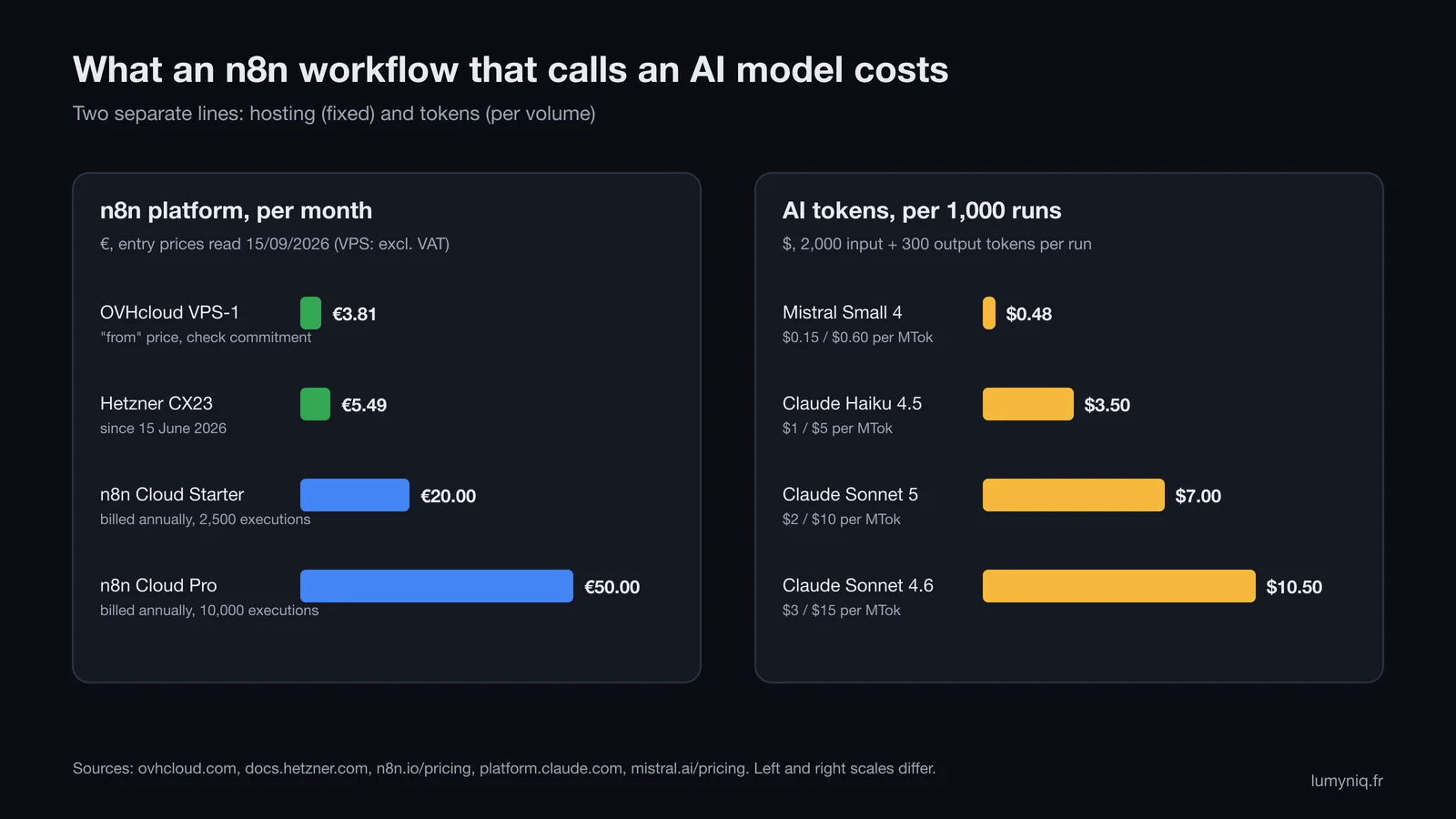
Running cost has two independent lines: the platform that runs n8n, fixed each month, and the tokens the AI model consumes, proportional to volume. Build and maintenance come on top if a provider builds the workflow.
Lumyniq chart based on the OVHcloud, Hetzner, n8n, Anthropic and Mistral pricing pages, read on 15 September 2026.
The platform
Option
Monthly price
Executions
Good to know
OVHcloud VPS-1 (2 vCores, 4 GB, 40 GB NVMe)
From €3.81 excl. VAT (€4.57 incl.)
No n8n quota
"From" price: the page mentions 12-month terms, check the no-commitment price
Hetzner CX23 (2 vCPU, 4 GB)
€5.49 excl. VAT
No n8n quota
Up from €3.99 before 15 June 2026; the new price applies to new orders and rescales
n8n Cloud Starter
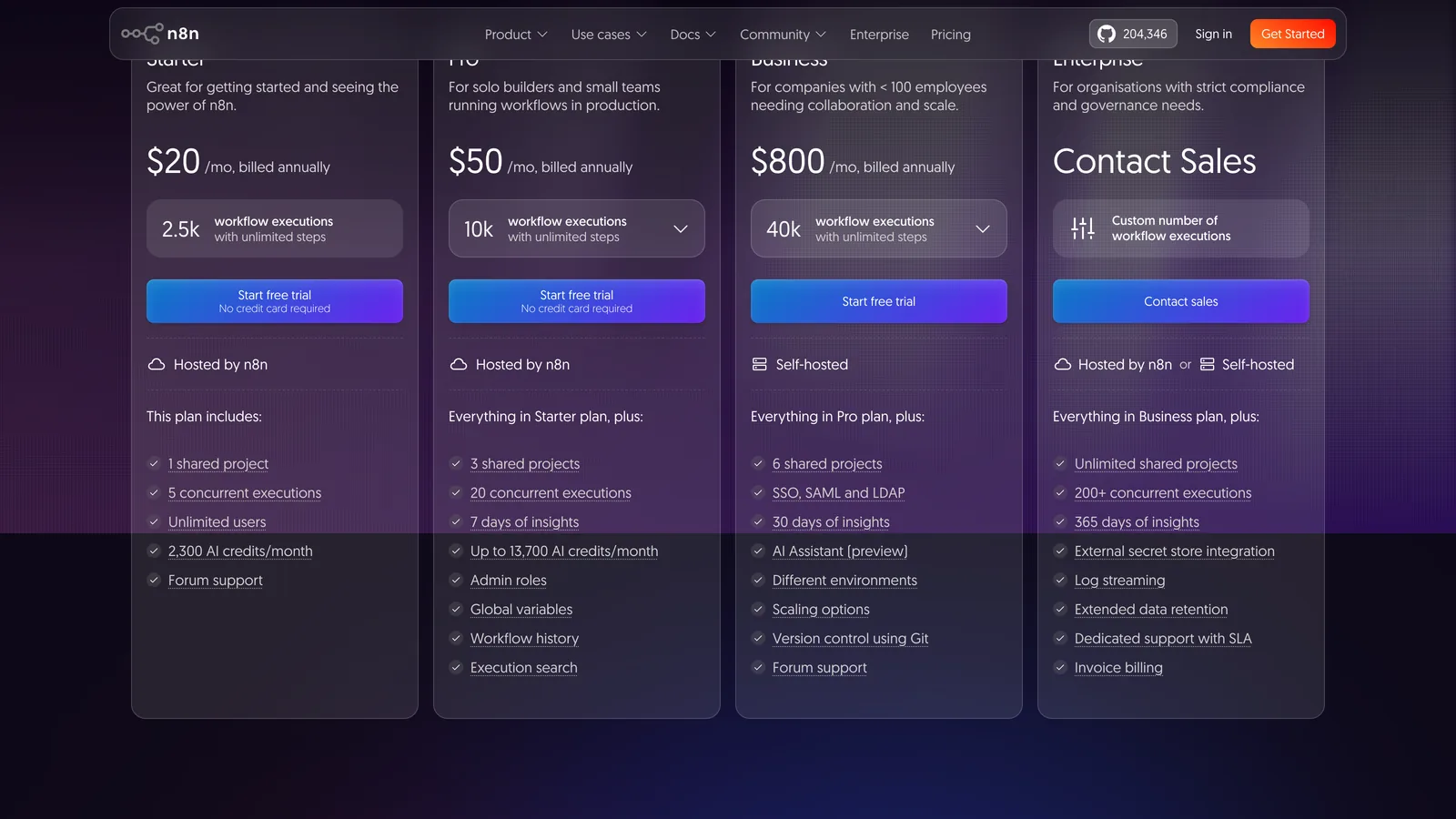
€20 billed annually
2,500, 5 concurrent
1 shared project, 2,300 AI credits per month
n8n Cloud Pro
€50 billed annually
10,000, 20 concurrent
3 projects, admin roles, global variables, workflow history
Checked on 15 September 2026 on ovhcloud.com, docs.hetzner.com and n8n.io/pricing.
On n8n Cloud, the annual billing toggle reads "Save 17%". On monthly billing, the dollar version of the pricing page showed $24 for Starter and $60 for Pro in our capture; we could not display the monthly euro amounts, so check the page before subscribing. The Business plan adds self-hosting, SSO and Git version control for 40,000 executions.
Source: n8n.io/pricing, dollar version shown in our capture of 15 September 2026.
On the pages we checked, n8n does not publish an official minimum hardware configuration. The two VPS above are each host's entry offer with 2 cores and 4 GB; queue mode with workers needs more (see below).
Tokens, worked out
Assumption: each run sends 2,000 tokens to the model (instructions and a short document) and gets 300 back (a structured extraction). 1,000 runs therefore use 2 million input tokens and 0.3 million output tokens. Prices are per million tokens (MTok).
Model
Input / output price
Math for 1,000 runs
Total
Mistral Small 4
$0.15 / $0.60
2 × 0.15 + 0.3 × 0.60 = 0.30 + 0.18
$0.48
Claude Haiku 4.5
$1 / $5
2 × 1 + 0.3 × 5 = 2.00 + 1.50
$3.50
Claude Sonnet 5
$2 / $10
2 × 2 + 0.3 × 10 = 4.00 + 3.00
$7.00
Claude Sonnet 4.6
$3 / $15
2 × 3 + 0.3 × 15 = 6.00 + 4.50
$10.50
Prices published by Anthropic (platform.claude.com) and Mistral (mistral.ai/pricing), read on 15 September 2026. Excluding VAT.
Three corrections to apply:
The tokenizer. Anthropic says its 4.7 and later models produce about 30% more tokens for the same text. For Claude Sonnet 5, the same document becomes about 2,600 input and 390 output tokens: 2.6 × 2 + 0.39 × 10 = 5.20 + 3.90, or $9.10 per 1,000 runs.
Volume. At 5,000 runs a month, multiply by five: $2.40 with Mistral Small 4, $17.50 with Haiku 4.5, $35 with Sonnet 5. On n8n Cloud, that volume exceeds Starter's 2,500 executions and requires Pro.
Discounts. Anthropic's Batch API costs 50% less, useful for overnight processing, and cache reads are billed at 0.1 times the input price when instructions repeat.
Full example: a firm extracting 1,000 documents a month with workflow 5 on a Hetzner CX23 and Claude Haiku 4.5 pays €5.49 excl. VAT for hosting and about $3.50 in tokens. Anthropic has announced Haiku 4.5 will be retired no earlier than 15 October 2026: plan to test another model. Other Claude prices and worked examples are in our Claude API pricing guide.
Quotas
What counts as an execution on n8n Cloud
The pricing page defines an execution as one full run of the workflow, however many steps or however much data. The docs add two exceptions:
runs started manually in the editor do not count, so your tests are free;
a sub-workflow called by another does not count: only the parent workflow is counted.
The consequence follows from the trigger. A workflow started by a Schedule Trigger every 5 minutes runs 288 times a day, or 8,640 executions over 30 days, even when there is nothing to process: three and a half times the Starter quota. The same processing triggered by an email or a webhook only uses the runs that matter. Steps shared by several workflows (logging, purge, alerts) are good candidates for sub-workflows.
Production
What to set up before going to production
A template imported from the gallery works in a demo. In self-hosted production, five settings prevent most incidents.
An error workflow. It must start with an Error Trigger node and is set in Workflow Settings, under Error workflow. One handler can serve all your workflows and send a Slack or email alert. The Stop and Error node forces a failure when a business condition is not met (unreadable document, forbidden file).
N8N_ENCRYPTION_KEY. It encrypts the credentials stored in n8n. If you do not set it, n8n generates one on first start and stores it in ~/.n8n: set it yourself, back it up off the server, and give every queue-mode worker the same value.
Queue mode, only when needed. It splits a main instance, Redis and workers (EXECUTIONS_MODE=queue). It requires PostgreSQL, since SQLite is not supported, and S3 storage for binary files. With an MCP Server Trigger and several webhook replicas, all /mcp* traffic must go to a single replica.
The built-in audit.n8n audit (or a POST to /audit) reports on credentials, database, filesystem, nodes and the instance, including unprotected webhooks and an outdated version. Run it after every update.
Locked-down triggers. A Chat Trigger offers three modes: no authentication, Basic Auth or n8n User Auth. For an internal tool, avoid "None" and keep "Make Chat Publicly Available" off.
The Community edition has no SSO (SAML, LDAP), Git version control, environments, external secrets or log streaming. A law firm or clinic that needs those controls looks at the Business or Enterprise plans. Agent-level safeguards (prompt injection, tool permissions) are covered in our AI agent security guide.
Security
The critical vulnerabilities of 2025-2026 and which version to run
An unpatched self-hosted instance is the main weakness of an n8n workflow. Four critical vulnerabilities published between December 2025 and February 2026 are enough to set a minimum version.
Vulnerability
Score
Type
Login required
Fixed in
CVE-2025-68613
9.9
Expression injection leading to code execution. In the CISA KEV catalog since 11 March 2026
Yes
1.120.4, 1.121.1, 1.122.0
CVE-2026-21858 ("Ni8mare")
10.0
File access through a form or webhook
No
1.121.0
CVE-2026-1470
9.9
Code execution through expressions
Yes
1.123.17, 2.4.5, 2.5.1
CVE-2026-25049
9.4
Expression sandbox escape leading to command execution, follow-up to CVE-2025-68613
Yes
1.123.17, 2.5.2
Sources: n8n GitHub Security Advisories and CISA alert of 11 March 2026, checked on 15 September 2026.
1.x line: at least 1.123.17 for these four. Advisory GHSA-6xcw-7xm6-48c6 of 2 September 2026 (sandbox escape in the legacy expression engine, score 7.7, default engine not affected) is only fixed in 1.123.76.
2.x line: at least 2.5.2 for the four, and 2.37.7 or 2.38.2 for the September advisory. The latest stable release is 2.39.5, published on 14 September 2026.
The pace: ten security advisories were published on 2 and 3 September 2026 alone. Plan a monthly update, and act within days for an unauthenticated flaw such as CVE-2026-21858.
Licence
The licence in two sentences
n8n's Sustainable Use License allows use and modification for your own internal business purposes or for non-commercial or personal use, and files marked .ee. fall under a separate Enterprise licence. Who can build your workflows, and where to host them, is covered in our article on n8n agencies, integrators and freelancers.
Limits
Missing integrations, and how to work around them
Tool
Native node
Alternative as of 15 September 2026
Twenty CRM
No
Community nodes: n8n-nodes-twenty 0.0.5 (last modified 6 July 2025, tested on n8n 1.91.3), n8n-nodes-twentycrm, n8n-nodes-twenty-dynamic, @linkedpromo/n8n-nodes-twenty. Otherwise HTTP Request against the Twenty API
Doctolib
No
None: no n8n integration page and no public Doctolib API
Yousign
No
Community node romainminaud/n8n-nodes-yousign (API v3)
DocuSign
No
Community node hansdoebel/n8n-nodes-docusign, "very early development" according to its author. Template no. 7185 uses DocuSign
Gmail, Google Calendar, HubSpot, Airtable, Slack, Notion, Twilio, Anthropic
Yes
Native nodes
Checked on docs.n8n.io, n8n.io/integrations, the npm registry and GitHub on 15 September 2026.
A community node is third-party code running inside your instance, with access to its credentials: read it, pin its version and test it on every n8n update. For a CRM, the HTTP Request node against a documented API is often easier to maintain. If you are considering an open, self-hostable CRM, see our Twenty CRM page.
Getting help
Having these workflows built
Lumyniq, an AI automation agency based in Paris, designs n8n workflows and AI agents for small businesses in real estate, legal, healthcare and HR, and connects them to the tools already in place. Every project starts with an audit of the process to automate, before any quote. See the n8n offer and custom AI agents.
FAQ
Frequently asked questions about n8n workflows
The ones that pay off automate a repetitive sort followed by an action: qualifying inbound enquiries, extracting documents, appointment reminders, first-pass CV screening, onboarding. As of 15 September 2026, the n8n.io gallery has free templates for each, such as no. 5428 (real estate leads) or no. 15790 (legal documents). Add a human approval step before any action toward a client, patient or candidate.