In short
What should you remember about the Agent Builder shutdown?
30 Nov 2026
Agent Builder, the Evals dashboard and API, and the v1/prompts API shut down
OpenAI, Deprecations page, read on 29 October 2026, updated on 1 November 2026
31 Oct 2026
Since this date, existing evals have been read-only; their content remains available according to OpenAI’s Evals guide
OpenAI, Deprecations page and Evals guide, updated on 1 November 2026
180 days
Notice between the 3 June announcement and the shutdown, against 365 days for the Assistants API
Lumyniq count from OpenAI’s Deprecations page
3 channels
To run a workspace agent: ChatGPT, Slack and an API trigger. In our reading, none for a visitor to your website
Lumyniq reading of OpenAI’s Workspace Agents help article, read on 29 October 2026
This page is for teams that built an agent in Agent Builder and must move it within a month. If you have not built anything yet, choosing a provider is covered in our comparison of Claude, ChatGPT and Mistral for business.
Timeline
What stops, and on which date?
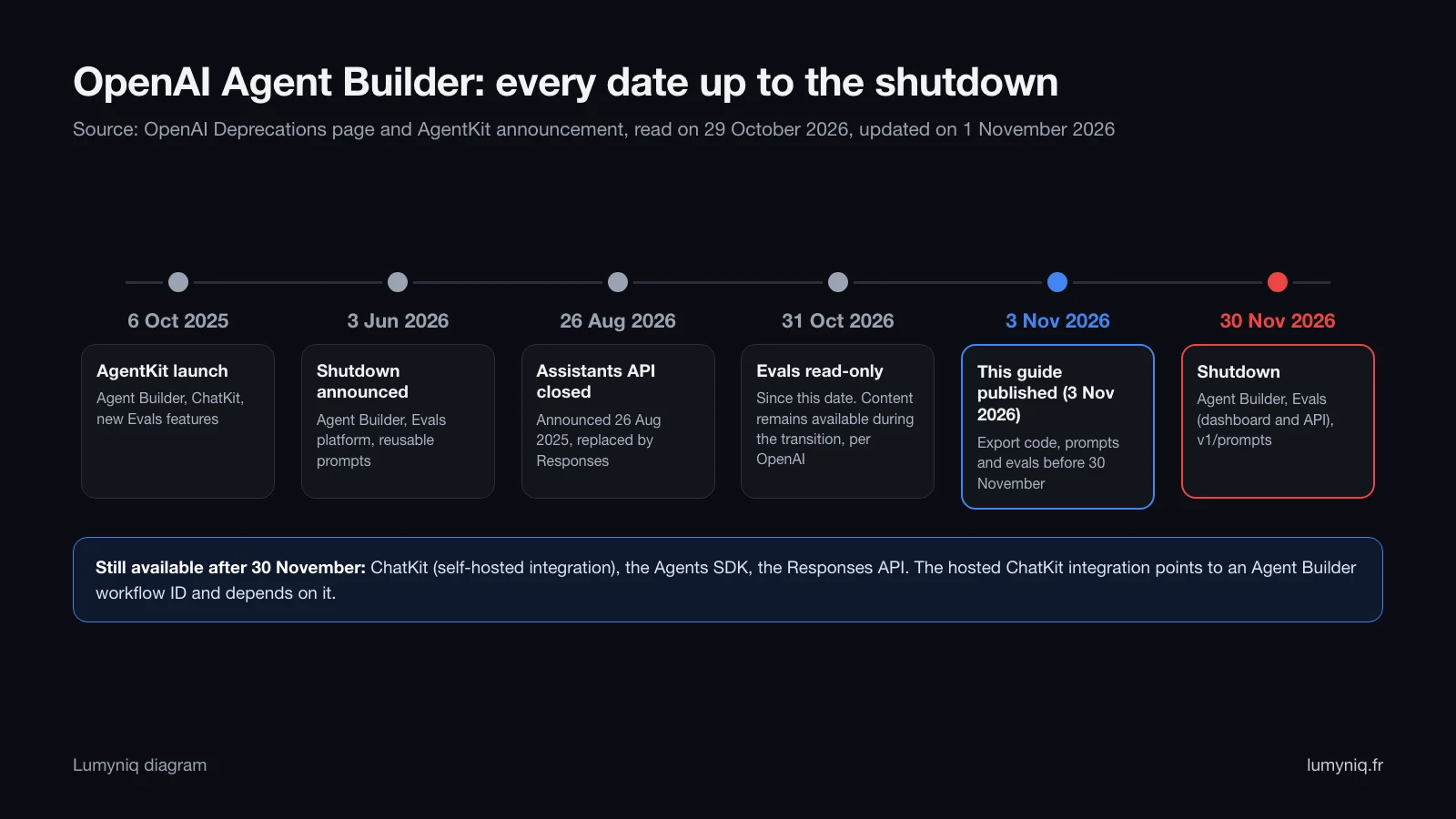
| Date | Product | What happens | Source |
|---|---|---|---|
| 6 October 2025 | AgentKit | Launch of Agent Builder, ChatKit, Connector Registry and new Evals features | OpenAI AgentKit announcement |
| 3 June 2026 | Agent Builder, Evals, reusable prompts | Shutdown announced to developers | Deprecations page |
| 26 August 2026 | Assistants API | Shut down, announced on 26 August 2025 (replaced by Responses and Conversations) | Deprecations page |
| 31 October 2026 | Evals | Existing evals read-only since this date; content remains available during the transition | Deprecations page, Evals guide |
| 30 November 2026 | Agent Builder | Scheduled shutdown | Deprecations page |
| 30 November 2026 | Evals | Dashboard and API shut down | Deprecations page |
| 30 November 2026 | Reusable prompts | v1/prompts API and prompt objects shut down | Deprecations page |
| After 30 November 2026 | ChatKit | “ChatKit remains available”, per OpenAI | Deprecations page, ChatKit guide |
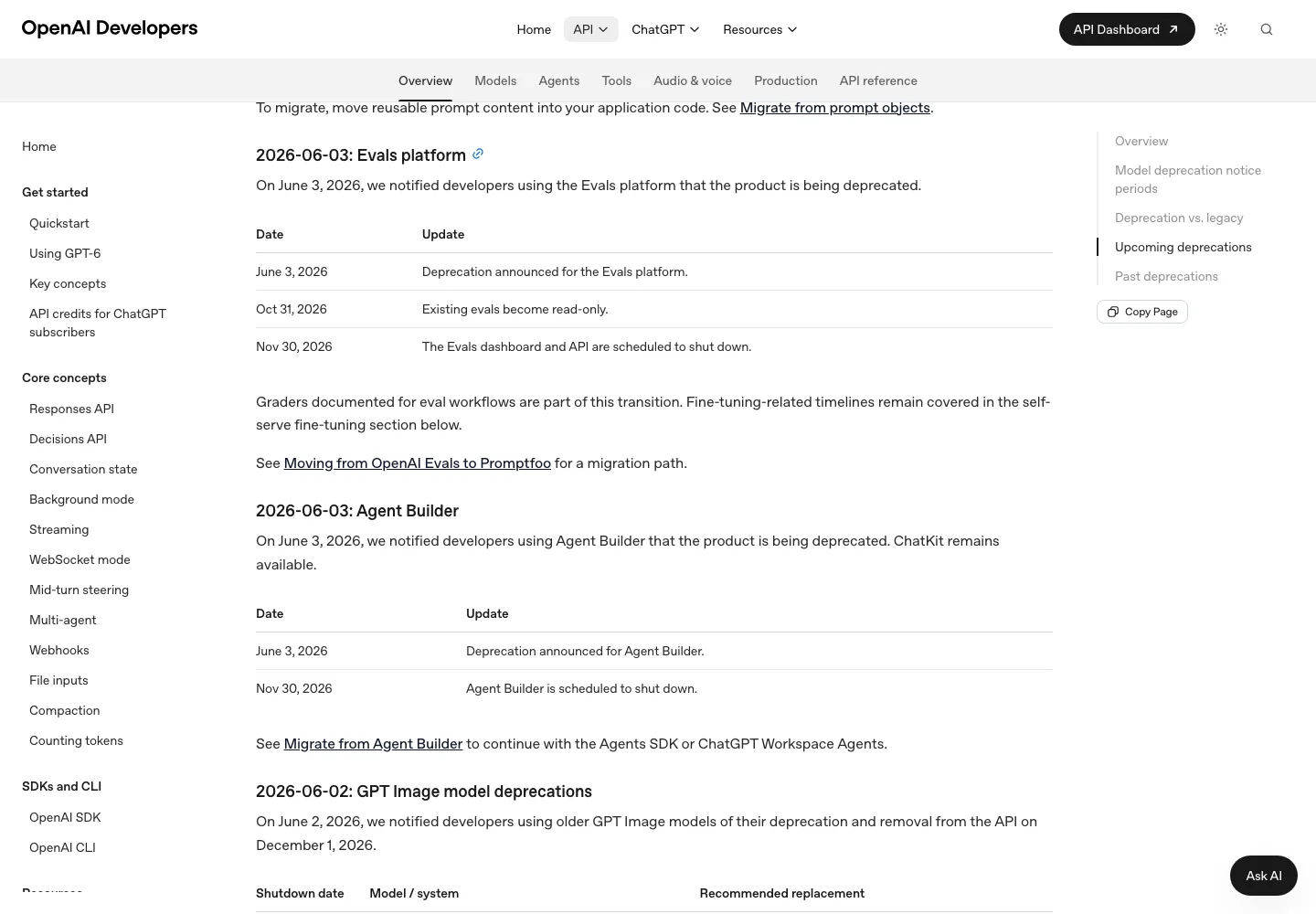
The notice is short. OpenAI left 180 days between the 3 June announcement and the 30 November shutdown. For the Assistants API, the announced notice was one year to the day (Lumyniq count from OpenAI’s Deprecations page). Agent Builder will have existed for just under 14 months. On this guide’s publication date, 3 November 2026, 27 days remain before the shutdown, and evals have been read-only since 31 October.
Terms
AgentKit, Agent Builder, ChatKit: what exactly is closing?
Since 3 June 2026 the AgentKit announcement carries an update at the top: from 30 November 2026, Agent Builder and Evals “will no longer be available on the OpenAI platform”. The same note gives OpenAI’s sorting rule: the Agents SDK for workflows that should continue as code, Workspace Agents for use cases better suited to natural-language prompting.
| AgentKit component | Status on 29 October 2026 | Replacement named by OpenAI |
|---|---|---|
| Agent Builder (visual editor) | Shuts down 30 November 2026 | Agents SDK or ChatGPT Workspace Agents |
| Evals (datasets, trace grading) | Read-only since 31 October, shutdown 30 November | Promptfoo (OpenAI cookbook guide) |
| Reusable prompts (v1/prompts) | Shuts down 30 November 2026 | Prompts moved into application code |
| ChatKit | Remains available | Self-hosted integration recommended for new projects |
| Agents SDK (Python, TypeScript) | Not in the deprecations list | Not applicable |
Connector Registry does not appear in the deprecations we read. AgentKit’s Guardrails also exist as open-source libraries for Python and JavaScript, so they can be kept outside Agent Builder.
What you have
What happens to your existing workflows?
Four things disappear or change on 30 November, and each one is handled differently.
- The workflow graph. Its nodes, branches and versions live in the editor. The export produces Python or TypeScript code for the Agents SDK: the only output format OpenAI describes.
- The hosted ChatKit widget. The hosted integration passes a workflow ID; the ChatKit guide says “Use this path only if you already have an Agent Builder workflow”. Our reading: without the workflow, the widget has nothing left to call. The self-hosted integration, using the ChatKit Python SDK (Apache 2.0 licence), connects to any agent service.
- Prompts stored as objects. The v1/prompts API shuts down the same day. OpenAI asks you to move their content into application code.
- Evals attached to agents. They have been read-only since 31 October and shut down on 30 November, graders included.
Two questions have no official answer as of 29 October 2026: what happens to traces and data linked to workflows after the shutdown, and whether a call to a published workflow fails on 1 December or after a delay. In the “Deprecation notice: Agent Builder” thread opened on 4 June 2026 on OpenAI’s developer forum, questions about hosted ChatKit got no reply from OpenAI staff.
Before 30 November 2026
What must you export before 30 November?
- List the workflows in every project of your OpenAI organisation, published or not, with the version running in production.
- Find what calls them: a ChatKit widget on a site, backend calls, internal integrations. Search your code and environment variables for workflow IDs.
- Export the code: open the workflow, Code, Agents SDK, Python or TypeScript, copy the complete export and commit it to a Git repository.
- Copy the instructions of every Agent node and every reusable prompt into files you own.
- Copy evals first: datasets, graders, latest results. They have been read-only since 31 October; as of 1 November 2026, the API reference still documents reading an eval, its runs and their results. These copies become the test bench for the new version.
- Record tools and connections: MCP servers, connectors, accounts used. The migration guide says connected apps, authentication and permissions are configured again separately. If your access grants go through an internal approval, start it now.
- List the vector stores queried by File search nodes, with their source files. They are not in the deprecations list, but switching provider means re-indexing.
- Record the safeguards: Guardrails nodes (PII, jailbreak), Human approval nodes, If/else and While conditions. Check that they appear in the export.
- Take 20 to 50 real conversations as test cases, with the expected answer.
- Replay those conversations on the new version before switching, and keep a way to roll back.
- Name an owner per workflow and a switchover date before 30 November, assuming everything stops that day.
- Ask OpenAI support what happens to data linked to your workflows, if they processed personal data.
- Decide what stops: a workflow nobody uses does not need migrating.
The 20 to 50 conversations figure is our own testing practice, with no external source: enough to cover frequent cases and refusals, few enough for one person to review.
Mapping
What does each Agent Builder node become?
| Agent Builder node | OpenAI Agents SDK | n8n | Claude Agent SDK |
|---|---|---|---|
| Start (chat input, state variables) | Run input and context | Chat Trigger or Webhook | Initial message and session |
| Agent (instructions, tools, model) | Agent | AI Agent node and model sub-node | Configured agent (system prompt, tools) |
| File search (OpenAI vector stores) | File search tool on the same vector stores | Vector store node, re-index required | MCP server or your own retrieval, re-index required |
| Guardrails (PII, jailbreak, hallucinations) | SDK guardrails, OpenAI Guardrails library | Check node or Code node to write | Hooks before and after each tool |
| MCP | Built-in MCP | MCP Client Tool | Built-in MCP |
| If/else, While (CEL expressions) | Python or TypeScript code | If, Switch, Loop nodes | Code around the agent |
| Human approval | Built-in human-in-the-loop | Tool-call approval (chat, Slack, email) | Tool permissions with approval |
| Transform, Set state | Code | Edit Fields and Code nodes | Code |
| Attached evals | Traces, then Promptfoo | n8n evaluations | Your own tooling |
Three elements move without a rewrite: an MCP server used in Agent Builder plugs into all three targets as it is, OpenAI’s Guardrails libraries for Python and JavaScript deploy outside Agent Builder, and self-hosted ChatKit connects to any agent service. What MCP exposes and its risks are covered in our guide to MCP for business.
The options
What are the migration paths, with their effort and losses?
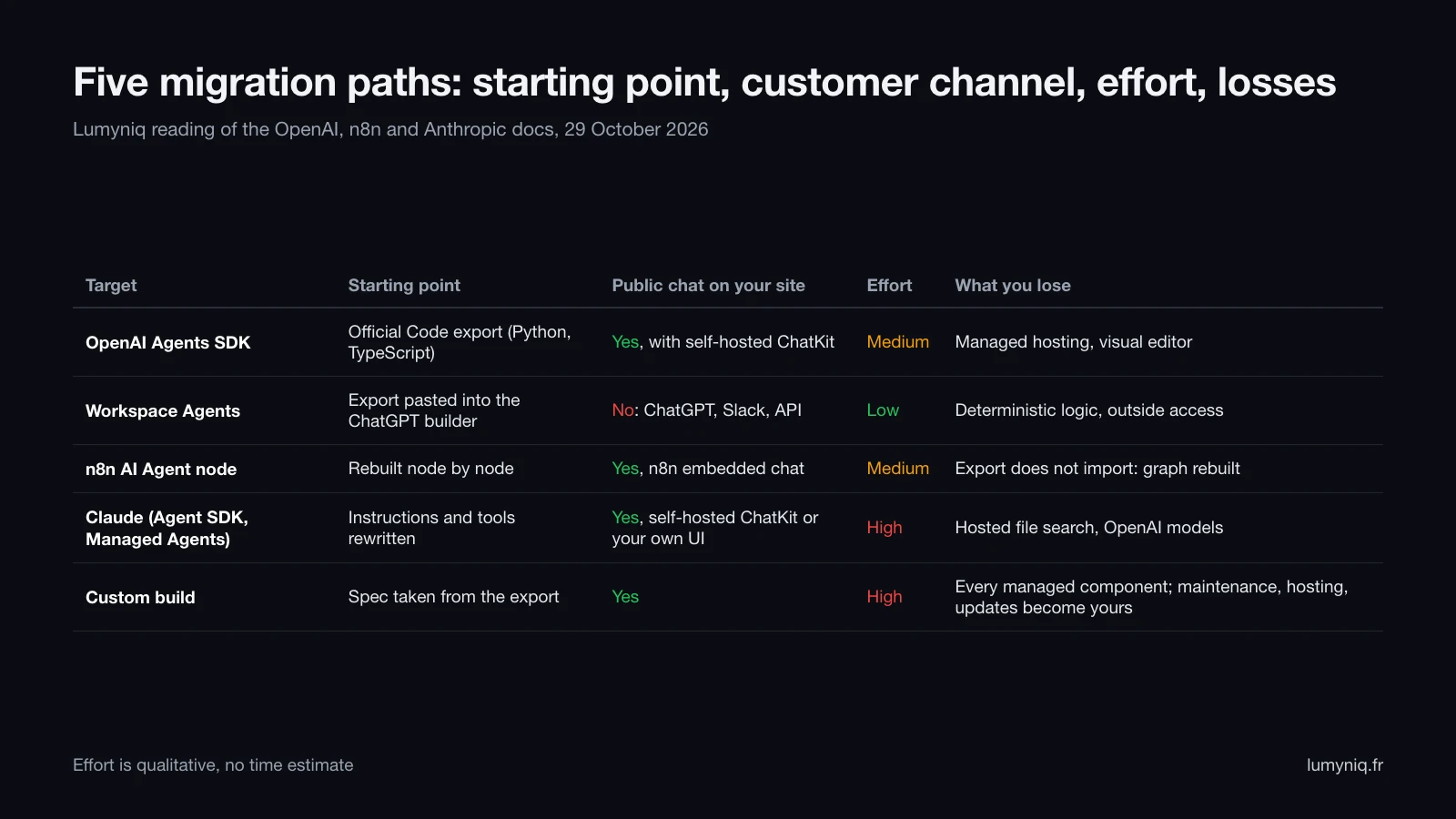
1. OpenAI Agents SDK
Effort: medium. This is the direct continuation: the Agent Builder export produces code for this SDK, in Python or TypeScript. The SDK provides agents, handoffs between agents, guardrails, sessions, tracing, MCP tools and human-in-the-loop. The Python docs also list adapters (LiteLLM, Any-LLM) to call models from other providers.
What carries over: instructions, tools, vector stores, models, and ChatKit if you host it yourself. What you lose: the visual editor and managed hosting. You now run the agent and handle its deployments, secrets and monitoring. A team without a developer will need to hire one or get outside help.
2. ChatGPT Workspace Agents
Effort: low. You need a ChatGPT Business, Enterprise or Edu workspace with workspace agents turned on (off by default at launch on Enterprise, according to OpenAI’s Workspace Agents help article, read on 29 October 2026). The migration guide has you paste the code export into the ChatGPT builder with a conversion prompt, then review what it flags. The agent gets apps (Google Drive, Slack, SharePoint), custom MCPs, skills, files (512 MB per file, 10 GB per agent, per the same article), a schedule and approval for write actions.
What carries over: the instructions and the general intent. What you lose: deterministic logic, which OpenAI flags itself: “Workflows with strong determinism at their core may not migrate faithfully to a workspace agent”. And any access from outside your organisation (see the next section). Cost moves to credits: for GPT-5.6, 100 credits per million input tokens and 500 for output, and 5 to 25 credits for a typical end-to-end run, per OpenAI’s rate card read on 29 October 2026.
3. n8n AI Agent node
Effort: medium. The Agents SDK export does not import into n8n: it serves as a spec, and the workflow is rebuilt node by node. Since version 1.82.0, according to the n8n docs read on 29 October 2026, every AI Agent node works as a Tools Agent, with at least one tool and a model connected. n8n brings explicit branches and loops, a large integration catalogue, and human approval of tool calls through chat, Slack, Teams, WhatsApp or email. The Chat Trigger node publishes a hosted chat or a widget to embed on your site.
What carries over: instructions, MCP servers, OpenAI models if you keep them. What you lose: the original graph, OpenAI vector stores if you change database, and ready-made Guardrails. What breaks with n8n in production (memory, caps, versioning) is documented in our guide n8n for AI agents: what works, what breaks, and our n8n agency handles this kind of rebuild.
4. Claude: Agent SDK or Managed Agents
Effort: high. Switching provider means rewriting instructions for another model and retesting every case. Anthropic offers two forms. The Claude Agent SDK, in Python and TypeScript, ships the Claude Code agent loop: built-in tools, hooks, subagents, MCP, permissions and sessions, in a process you operate. Claude Managed Agents, in beta (header managed-agents-2026-04-01), hosts the agent loop in a sandbox managed by Anthropic or on your own infrastructure, with scheduled runs.
Managed Agents costs tokens at standard rates plus $0.08 per active session-hour, according to Anthropic’s pricing page read on 29 October 2026. The docs state Managed Agents is not eligible for Zero Data Retention or a HIPAA BAA, because sessions are stored until you delete them. What you lose: hosted File search and OpenAI models. Choosing between the two providers is covered in our comparison of Claude and ChatGPT for business, and connecting it to your systems on our Claude integration page.
5. Custom build
Effort: high. The export becomes the spec, and the agent is built on the architecture that suits you: direct model API calls, a vector database you choose, your own interface. What you lose: every managed component; maintenance, hosting and updates become your job. This is the path to take when the agent touches sensitive data or business systems the previous targets do not connect to. Lumyniq builds this kind of custom AI agent, with one limit to know: it is an agency project, with a lead time and a project budget; there is no self-service version.
The fact that changes the choice
Can your customer chatbot move to Workspace Agents?
ChatKit was presented at launch as embeddable “into apps or websites”, and the AgentKit announcement cites customer support agents. OpenAI’s migration guide sets the two paths side by side without mentioning public channels. The Workspace Agents help article shows three obstacles for an agent that answers customers.
- The API trigger requires a Workspace Agent access token created in ChatGPT Admin, and returns “202 Accepted” with a conversation URL that can be null. It starts a background task, with no live conversation with a customer.
- Slack requires shared connections for every app the agent uses, and OpenAI recommends limiting the agent to a trusted channel of your own employees.
- ChatGPT requires a seat in your workspace.
For a public chatbot, that leaves the Agents SDK with ChatKit on your own server, the n8n chat widget, or a custom interface connected to Claude or another model. The ChatKit Python SDK connects to any agent service: you can keep the ChatKit interface and change the engine behind it.
Decision
Which target for which type of agent?
| Workflow type | Recommended target | Why | Alternative |
|---|---|---|---|
| Customer support bot on your site (hosted ChatKit) | Agents SDK + self-hosted ChatKit | The only OpenAI path with a public channel; keeps the interface and the models | n8n Chat Trigger if the team does not code |
| Internal agent that calls tools (Drive, Slack, CRM) | Workspace Agents | No hosting, apps and MCP, Slack, schedules, write approvals | n8n if the tool is not connected to ChatGPT |
| RAG assistant on your documents (File search) | Agents SDK | Queries the same vector stores, no re-indexing | Workspace agent files for internal use (512 MB per file, 10 GB per agent, according to OpenAI’s Workspace Agents help article, read on 29 October 2026) |
| Workflow with branches and loops (If/else, While, state) | n8n or Agents SDK | Explicit logic; OpenAI warns against Workspace Agents for deterministic logic | Custom build |
| Long task on files (reports, analyses) | Claude Managed Agents | Sessions lasting minutes or hours, sandbox, scheduled runs (Anthropic Managed Agents docs) | Claude Agent SDK on your server |
| Agent on sensitive data or business systems | Custom build | Control over hosting, logs and access | Agents SDK on your infrastructure |
| Workflow nobody uses | Switch it off | Nothing to migrate | Not applicable |
Limits
What does migration not fix?
Behaviour. Our guide on how to deploy an AI agent to production covers testing, monitoring and rollback.
Evals. After 30 November there is no Evals product at OpenAI. Without a copy of your evals, the new version has no test bench.
Access. App connections and permissions are configured again on the new target.
Dependence. Agent Builder launched in October 2025 and shuts down on 30 November 2026 with 180 days’ notice. Commit the export, the prompts and the tests to your repository, whatever the target.
What this page does not know. As of 1 November 2026, OpenAI does not say what happens to data linked to workflows after the shutdown.
Support
Do you need a provider to migrate?
Lumyniq, a French AI automation agency founded by Zakaria El Asri, takes over existing agents on n8n, on Claude or as a custom build. Every project starts with the inventory described above, which sets the target before any quote.
FAQ