Definition
What is an AI agent?
The most useful definition comes from a model maker. In “Building effective agents”, published on 19 December 2024, Anthropic separates two families. Workflows orchestrate a model and tools along paths written in advance in code. Agents let the model direct its own process and its use of tools. The same piece advises finding the simplest solution and adding complexity only when needed, which can mean not building an agent at all.
Three things stand out in Anthropic’s definition: a goal (handle a valuation request, assemble a file), tools the agent may call (read the CRM, send an email, use the calendar) and a stop condition (goal reached, step limit, hand-over to a person). A system without tools stays an assistant that drafts text, and an agent without a stop condition can loop or act beyond its task.
The word has also become a sales line. In a press release dated 25 June 2025, Gartner describes “agent washing”: assistants, robotic process automation (RPA) and chatbots relabelled as agents without the capabilities. The firm estimates that only about 130 of the thousands of agentic AI vendors are real. Before buying an “agent”, ask what it decides on its own and which tools it can call.
Comparison
AI agent vs chatbot vs automation: what is the difference?
| Automation | Chatbot | AI agent | |
|---|---|---|---|
| Who picks the next step | A rule written in advance | The user, at each message | The model, inside set limits |
| Trigger | An event (form, date, email) | A message | A message or an event |
| What it produces | The same action every time | A text answer | Chained actions, then an answer |
| Access to your tools | Yes, on a fixed path | None, or read only | Yes, read and write |
| Facing the unexpected | Stops or fails | Answers, sometimes off the mark | Changes path, or hands over |
| Cost per run | Close to zero, predictable | One model call per answer | Several model calls per task |
| Main risk | Breaks when a format changes | States something false | Acts on something false |
| Typical tools | n8n, Make, Zapier | FAQ widget, custom GPT | Zapier Agents, n8n AI Agent node, a model API |
The risk row explains why an agent needs more care than a chatbot: a mistake becomes an edited record or a sent email. Our guide to AI agent security covers the attacks that exploit this ability to act.
What about ChatGPT? ChatGPT is first a chatbot. Its pricing page, read on 29 October 2026, lists custom GPTs under the Plus plan (€23 a month), mentions “limited ChatGPT Work access on desktop” for the free plan, and presents “Dot”, described as an always-on agent, in the Pro plan (from €103 a month). These features work for the person who is signed in. An agent that answers your customers and writes to your CRM is a different build, covered below. If you built an agent with OpenAI’s Agent Builder, our page on the OpenAI Agent Builder shutdown on 30 November 2026 explains how to migrate. If you want a ready-made conversational assistant, our comparison of the best AI chatbots for business ranks them by use case.
How it works
How does an AI agent work?
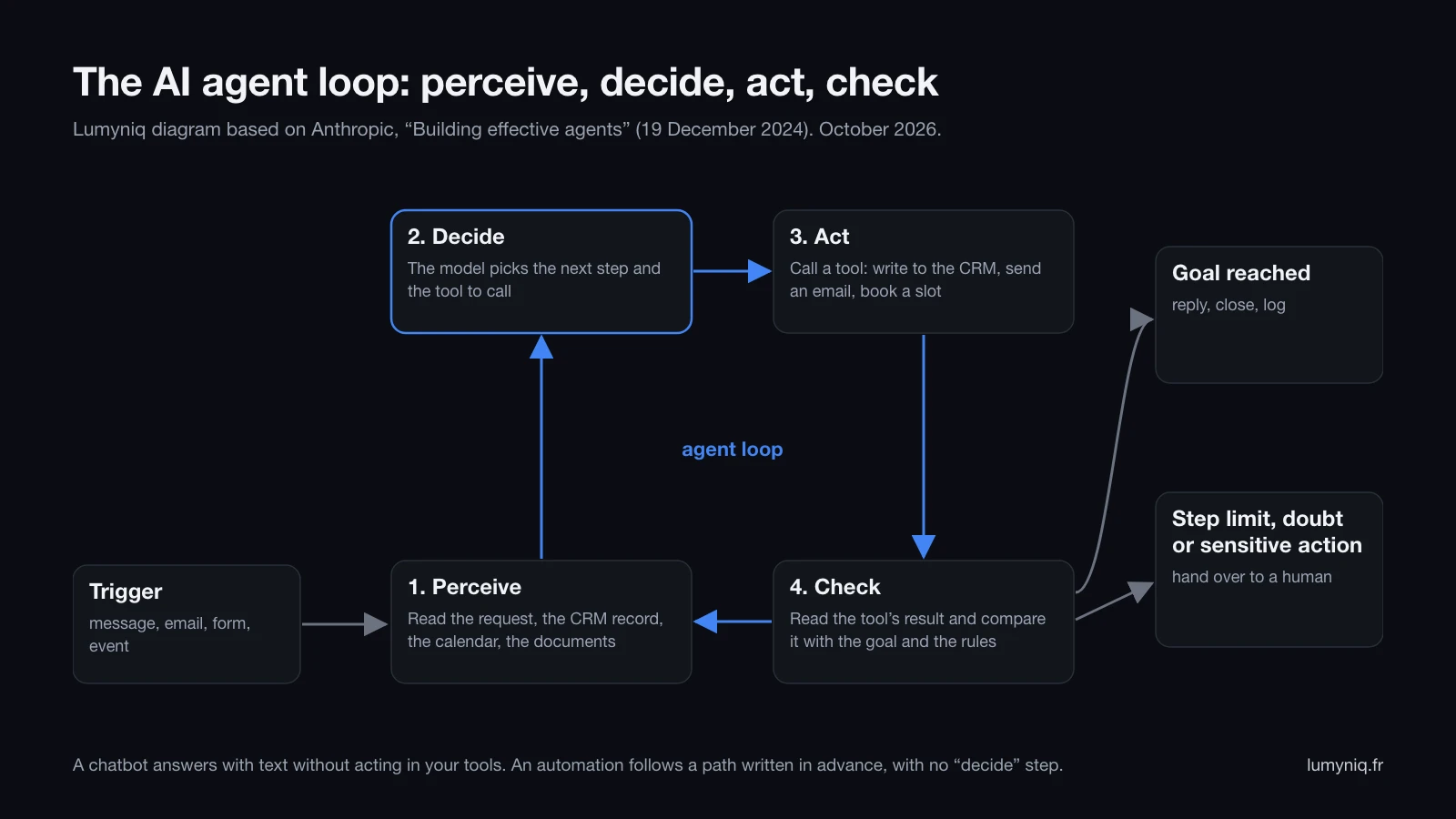
Take a valuation request that reaches a real estate agency’s website on a Tuesday at 9 pm.
- Perceive. The agent reads the form and looks the contact up in the CRM. It finds the property address; the floor area is missing.
- Decide. The model judges that one detail is missing before a useful appointment can be offered, and chooses to write to the seller.
- Act. It sends an email that introduces itself as the agency’s AI assistant and asks two questions: floor area and desired timeline.
- Check. When the answer arrives, it checks consistency (12 m² for a house raises a doubt), then goes round again: reads the estate agent’s calendar, offers two slots, creates the record.
The two exits matter as much as the loop. Anthropic recommends stop conditions, such as a maximum number of iterations, and checkpoints where the agent waits for human feedback. In the example, a seller who asks “what is my house worth?” leaves the loop: a valuation commits the agency, so it goes back to the estate agent. Setting up these guardrails (least privilege, a test environment, logs, rollback) is the subject of our guide to deploying an AI agent to production.
The original table
Ten real tasks: agent, chatbot or plain automation?
| Task | Sector | Verdict | Why |
|---|---|---|---|
| Send the month’s invoices to the accountant at month end | All | Automation | Same path every time, no decision |
| Copy contacts from a web form into the CRM | Real estate | Automation | Field-to-field mapping, a rule is enough |
| Text a patient a reminder the day before the appointment | Healthcare | Automation | Fixed trigger and message |
| Chase a candidate who has not replied after three days | HR | Automation | A date and a message template |
| Answer questions about a firm’s opening hours, fees and documents to bring | Legal | Chatbot | Text answer from existing pages, no action |
| Explain the leave policy to an employee from the company agreement | HR | Chatbot | Search in a document, no write to any tool |
| Qualify a valuation request, complete the record and offer an appointment | Real estate | Agent | Questions and tools vary with the seller’s answers |
| Collect a rental application’s documents, spot missing or inconsistent ones, chase them | Real estate | Agent | Each file has different gaps, it must read then act |
| Sort a law firm’s incoming mail by matter and draft a reply | Legal | Agent | Linking to the right matter takes reading and searching; the lawyer approves |
| Prepare a new hire’s arrival: accounts, equipment, meetings by role | HR | Agent | The list of actions depends on role, site and the manager’s answers |
Two takeaways. First, the automations at the top of the table should stay automations: they cost almost nothing per run and always follow the same path. Running them through an agent adds model calls and some randomness for no gain. Second, no agent in the table makes a decision that commits the business: the estate agent sets the price, the lawyer signs the reply, the manager approves the arrival plan.
Examples
What are examples of AI agents in business?
1. Real estate: answer a seller within a minute
The agent reads the valuation request, links it to the existing contact, asks the missing questions, offers slots from the estate agent’s calendar and creates the record in the transaction software. It never gives a price. It only calls the seller if they ticked the call-back consent box. The full flow is described on our AI for real estate page.
2. Real estate: complete a rental application
The agent receives a prospective tenant’s documents, checks they are legible and complete, compares names and amounts across documents, and writes to the applicant about what is missing. The property manager decides who gets the flat. In France, the agent must not ask for documents outside the regulatory list of permitted proofs; that list is coded as a rule, outside the model.
3. Legal: pre-qualify an incoming enquiry
On the firm’s form or messaging channel, the agent identifies the area of law, the relevant dates and the parties, checks the firm’s software for any party already known (to flag a possible conflict of interest to the lawyer) and offers an appointment. It gives no legal advice and promises nothing about the outcome. Uses specific to law firms are covered on our AI for legal page.
4. Legal: sort mail by matter
The agent reads each incoming email, links it to the matter, spots any deadlines mentioned and drafts a reply for the lawyer to review. Professional secrecy means knowing where this content goes: the choice of model and hosting comes before the first line of code.
5. Healthcare: handle appointment admin
The agent handles booking, rescheduling and cancellation requests, checks the calendar and confirms. It stays on admin: as soon as someone describes a symptom, it routes them to the front desk or to emergency services under rules written by the practitioner. The messages it stores can contain health data, which in France raises the question of HDS-certified hosting. See our AI for healthcare page.
6. HR: prepare a new hire’s arrival
From the job profile, the agent opens account requests, orders equipment, schedules first-week meetings and answers the new hire’s questions from the welcome handbook. The manager approves the list before anything is sent. See our AI for human resources page.
7. HR: schedule interviews
The agent reads recruiters’ availability, offers slots to candidates a person has shortlisted, reschedules when someone drops out and sends reminders. It does not screen applications. Under Annex III of the EU AI Act, an AI system that selects or filters candidates is high risk, with obligations applying from 2 December 2027 under Regulation (EU) 2026/1744.
Free AI agent
Is there such a thing as a free AI agent?
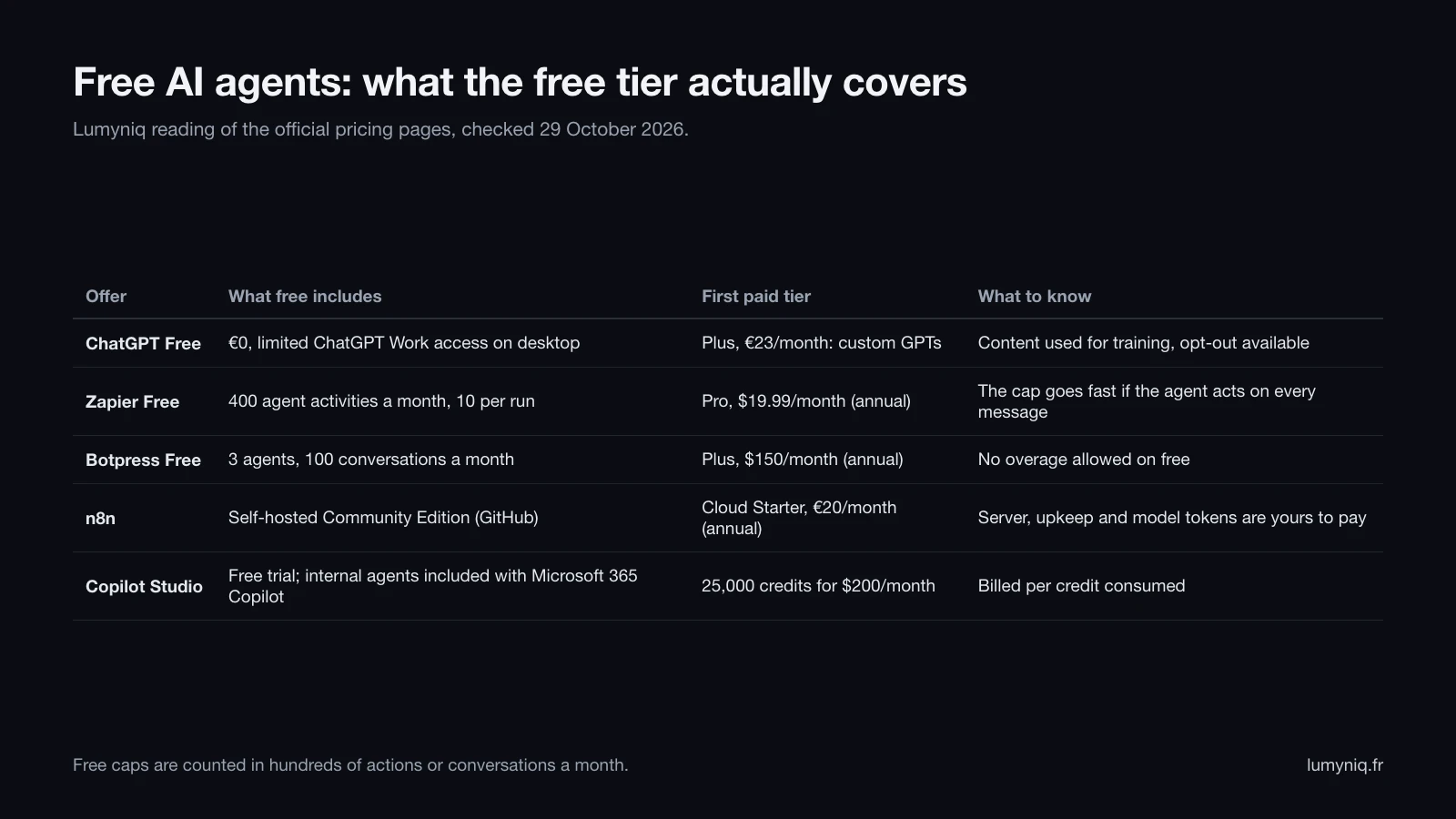
What “free” leaves out, according to the pricing pages read on 29 October 2026:
- Zapier Free: 400 agent activities a month, and each run pauses after 10 activities to ask before continuing. An agent that reads an email, searches the CRM, updates the record and replies uses several activities per message. Pro starts at $19.99 a month billed annually.
- Botpress Free: 3 agents and 100 conversations, with no overage. Plus costs $150 a month billed annually for 250 conversations, then $65 per pack of 100 conversations.
- n8n: a self-hosted Community Edition published on GitHub; the server, the upkeep and the model API key are yours to pay. Cloud Starter costs €20 a month billed annually for 2,500 executions. Our tests of n8n’s AI Agent node show what holds in production.
- ChatGPT Free: content is used to train models by default, with an opt-out.
- Copilot Studio: Microsoft 365 Copilot users ($30 per user per month, billed yearly) build internal agents at no extra cost. Beyond that, a free trial, then 25,000 credits for $200 a month, or pay-as-you-go with an Azure subscription.
The step-by-step method for a first agent on one of these offers, test set included, is in our guide to building an AI agent without code.
The calculation
How much does one AI agent conversation cost?
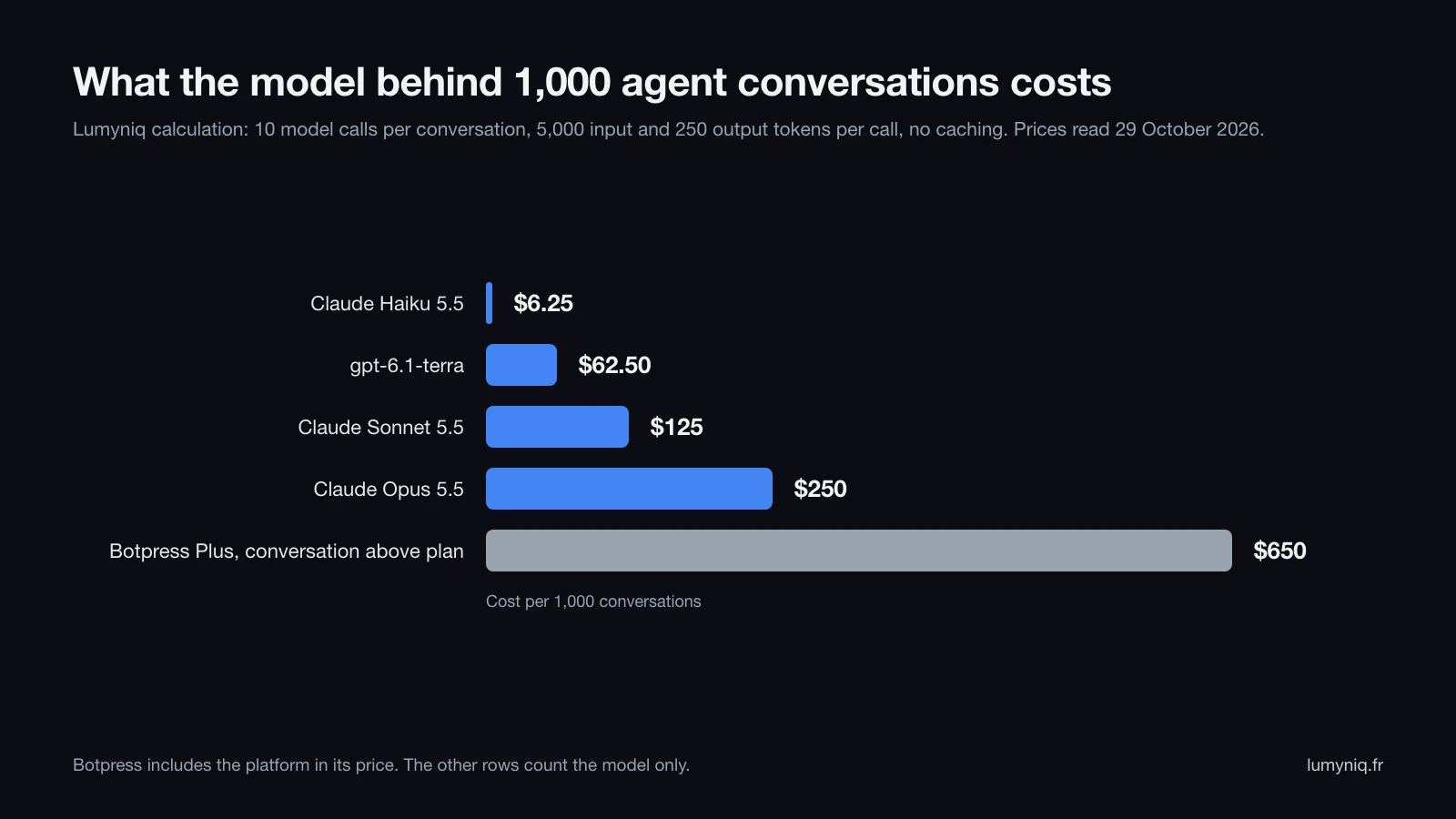
| Option | Input (per million tokens) | Output (per million tokens) | Per conversation | Per 1,000 conversations |
|---|---|---|---|---|
| Claude Haiku 5.5 (prompts up to 100,000 tokens) | $0.10 | $0.50 | $0.00625 | $6.25 |
| gpt-6.1-terra (OpenAI) | $1 | $5 | $0.0625 | $62.50 |
| Claude Sonnet 5.5 | $2 | $10 | $0.125 | $125 |
| Claude Opus 5.5 | $4 | $20 | $0.25 | $250 |
| Botpress Plus, conversation above plan | $0.10 of AI usage included | $0.10 of AI usage included | $0.65 | $650 |
Why ten calls? Because an agent does not answer in one go. Each turn of the loop sends the model the instructions, the history and the last tool result again, hence 5,000 tokens read per call. A chatbot that answers in a single call per message uses far fewer for the same conversation. Prompt caching narrows the gap: according to Anthropic’s price list read on 29 October 2026, a cache hit on Claude Sonnet 5.5 costs $0.10 per million tokens, 5% of the $2 input price; the general rule on the same page is 10%. The detail by model, Batch included, is in our guide to Claude API pricing.
These figures are one line of the budget. Integration with your software, testing on real cases, monitoring and maintenance can cost far more than the model, and depend on the task. Move to twenty calls per conversation and the cost doubles, so rerun the numbers with your own volumes.
Build an AI agent
How do you build an AI agent?
| Route | For whom | Starting cost found | Limit |
|---|---|---|---|
| No-code builder (Zapier Agents, Botpress, Copilot Studio) | A team without a developer, a first use case | Free to test, then $19.99 to $200 a month depending on the tool | Usage caps, only the connectors on offer |
| n8n (cloud or self-hosted) | A team comfortable with workflows | €20 a month in the cloud (annual), or your own server | Memory and scaling need watching |
| Code (a model API and an agent framework) | A technical team | Token prices, plus development time | Everything to build: logs, tests, interface |
| Agency or integrator | Sensitive data, several business systems, a team without developers | Project budget, quoted | Set-up time, reliance on a provider |
Whatever the route, the order of work is the same:
- Write the task in one sentence, with its end condition.
- List the tools it needs and give the agent the least privilege on each.
- Write the rules and the hand-over cases: prices, legal or medical advice, complaints.
- Gather a set of real cases, traps included, and test the agent on them before any launch.
- Start read-only or with human approval of each action, then open up step by step.
- State in the first message that it is an AI, and offer a person.
- Log every action and read the logs every week at the start.
The full method, test set included, is in our guide to building an AI agent without code.
Lumyniq is preparing Agent Studio: you paste your website address, and it sets up an AI agent that answers from those pages on WhatsApp, Telegram, Messenger, email and your site, then tests it against your rules. It has not launched yet; the Agent Studio waitlist is open.
For a process that touches several systems or sensitive data, Lumyniq builds custom AI agents. The limits are those of an agency: you buy a project run by a team, with no self-service access; the service page states 2 to 4 weeks for a well-scoped use case; and the budget is set after an audit of the process.
Failure modes
Why does Gartner expect over 40% of agent projects to be canceled?
The agent states a rule that does not exist
On 14 February 2024, British Columbia’s Civil Resolution Tribunal decided Moffatt v. Air Canada (2024 BCCRT 149). The website chatbot had told a customer he could claim a bereavement fare after travelling, within 90 days; the official page said the opposite. Air Canada argued it could not be held liable for information given by its chatbot. The tribunal called this a “remarkable submission” and held that the company is responsible for all the information on its website, chatbot included. Total ordered: CA$812.02. An agent should therefore answer from your documents, cite the source page, and hand over when no page covers the question.
The agent gets talked round
In “Project Vend”, published on 27 June 2025, Anthropic had an instance of Claude Sonnet 3.7 run a small shop in its office. The agent handed out discount codes to customers who asked, sold metal cubes at a loss because it had not checked their cost and, for a while, told customers to pay into an account it had made up. The shop did not make money. Rules about money (prices, discounts, refunds) therefore belong outside the model, or go through human approval.
The agent is forced on the customer
The Hacker News thread “Don’t make me talk to your chatbot”, posted on 3 March 2026, showed 259 points and 213 comments on 29 October 2026. Its title reads as a rejection of support bots. On our reading, the Ray Myers essay it links, dated 1 March 2026, covers a different subject: pasting unedited AI output into conversations between people. In the comments we read on 29 October 2026, several reply to the title with support-bot stories: a bank bot that misread the request and hung up, a public service that offered only a limited bot. Others described a bot that gathered the details and then passed the case to a person, and were happy with it. An agent that talks to your customers should therefore say it is an AI and keep a route to a person open at all times.
The agent obeys what it reads
An agent that reads emails, web pages or documents can find hidden instructions in them and follow them: this is indirect prompt injection. The countermeasures (least privilege, approval of sensitive actions, separating data from instructions) are covered in our guide to AI agent security.
Regulation
What the EU AI Act requires of an agent since 2 August 2026
The text, read on 29 October 2026, sets a design duty: the system must be built so that the person knows they are interacting with an AI. The information must be given clearly and distinguishably, at the latest at the first interaction, and meet accessibility requirements (Article 50(5)). The exception applies when it is obvious to a “reasonably well-informed, observant and circumspect” person, taking into account the circumstances and the context of use. On our reading, an agent that writes under a human first name does not meet that condition.
Who is covered? Article 3 defines the provider as whoever develops an AI system, or has it developed, and puts it into service under its own name or trademark. On our reading, a firm that commissions its agent and presents it under its own name fits that definition. Penalties under Article 99(4) reach €15 million or 3% of total worldwide annual turnover; for an SME, the lower of the two applies (Article 99(6)).
| Obligation | Date | Source |
|---|---|---|
| Inform people they are interacting with an AI (Article 50(1)) | 2 August 2026, no extra delay | Article 113 of the AI Act |
| Machine-readable marking of generated content (Article 50(2)), systems placed on the market before 2 August 2026 | 2 December 2026 | Regulation (EU) 2026/1744 of 8 July 2026 |
| High-risk systems in Annex III, recruitment included | 2 December 2027 | Regulation (EU) 2026/1744 |
The 2 December 2026 deadline granted by the Digital Omnibus covers only the marking of generated content. The duty to inform has applied since 2 August 2026 with no adjustment. In practice, the agent’s first message says it is an AI assistant, a voice agent says so when it picks up, and an email drafted by the agent flags it. Our page on the AI agent disclosure obligation gives the full checklist.
The limits
When not to build an AI agent
- The path is fixed. An automation does the job for almost nothing and without randomness. Four of the ten tasks in the table above are in this case.
- The volume is low. Setting up, testing and monitoring an agent takes time. For a monthly task, that time does not come back.
- The data is poor. An agent reading a half-filled CRM makes bad decisions faster. Clean-up comes first.
- Mistakes are expensive. A price, legal advice or medical guidance commits the business. The agent prepares, a person decides.
- Nobody will look after it. Models change: on 29 October 2026, Anthropic’s pricing page lists Claude Opus 4 and Opus 4.1 as retired from its API. An agent has to be maintained, retested and updated.
An agent does not fix a muddled process either: it runs it as it is, gaps included.
FAQ